> ## Documentation Index
> Fetch the complete documentation index at: https://docs.getlemma.com/llms.txt
> Use this file to discover all available pages before exploring further.
# Transaction categories
> Label transactions to track spending by type and simplify reconciliation and compliance reporting.
Transaction categories let you tag any transaction with a label such as "MSO Fees" or "Payroll". A category column is included in every [CSV export](/guides/export-transactions).
## How to categorize a transaction
### From the transaction details
Click any transaction to see its details. Use the **Category** dropdown to assign a category.
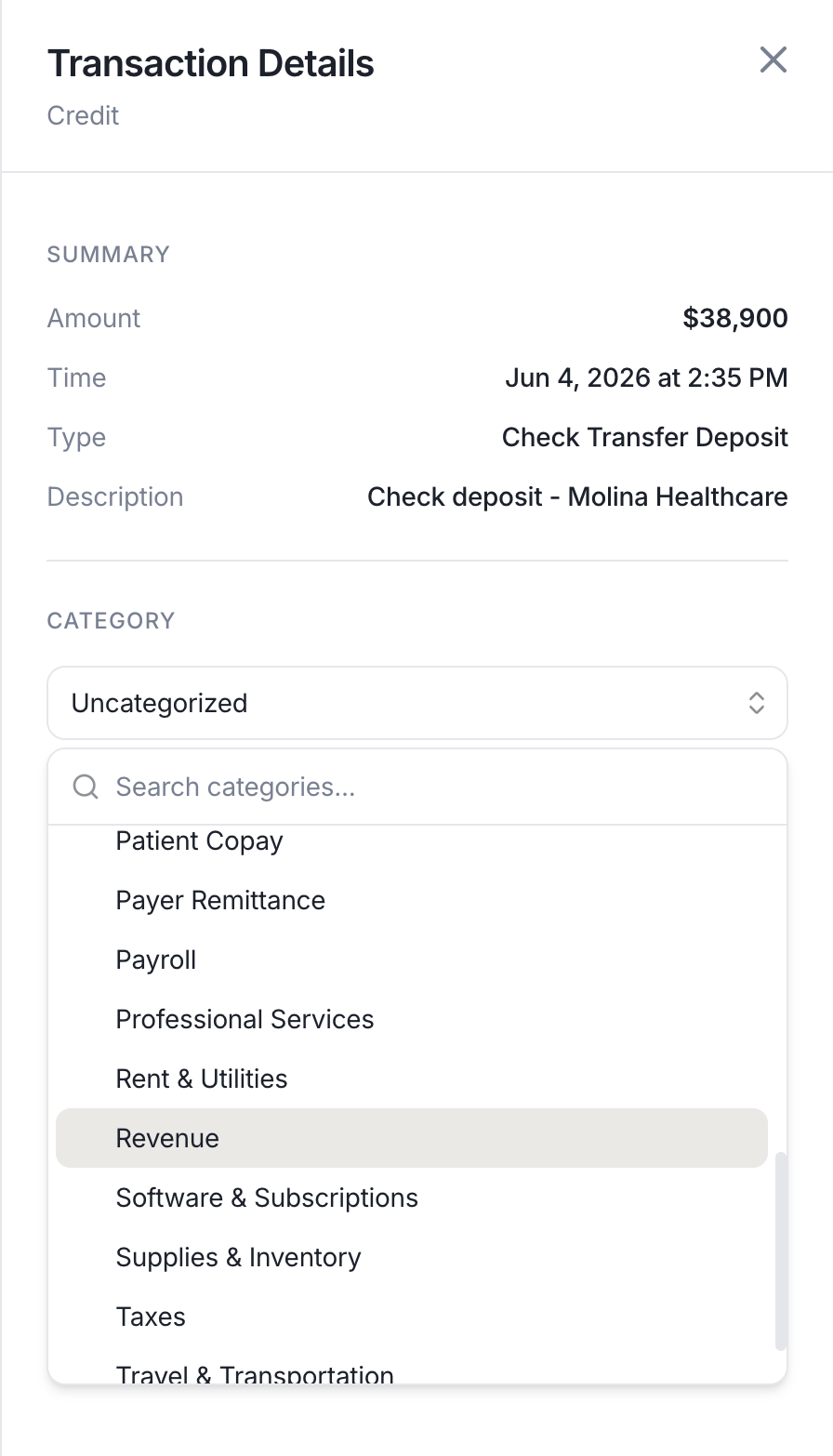 Categories are saved instantly and visible to all team members with access to your provider.
Read-only team members can also set categories. Categorization is treated as an annotation, not a financial action.
### When sending a transfer
Every time you send money from the [Move Money page](/guides/move-money), you will see an optional **Category** field. The category is applied to the resulting transaction the moment it's created, so there's nothing to tag afterwards. If the transfer needs [approval](/guides/approval-rules) first, the category is applied when the transfer is approved and sent.
## Built-in categories
The following categories are available to every provider by default:
| Category | Common use |
| ------------------------------ | -------------------------------------------------------------- |
| **Revenue** | Practice or business income not tied to a specific payer |
| **Payer Remittance** | Insurance payer payments on submitted claims |
| **Patient Copay** | Copays and out-of-pocket amounts collected from patients |
| **Interest** | Interest earned on account balances |
| **Patient / Insurance Refund** | Refunds issued to patients or returned to payers |
| **Payroll** | Staff wages and employer payroll taxes |
| **Rent & Utilities** | Office or equipment lease payments and utilities |
| **Supplies & Inventory** | Medical or office consumables |
| **Equipment Purchase** | Capital purchases of clinical or office equipment |
| **Insurance Premium** | Malpractice, health, property, or liability insurance |
| **Software & Subscriptions** | SaaS subscriptions and software licenses |
| **Professional Services** | Legal, accounting, or consulting fees |
| **Vendor Payment** | Suppliers, contractors, or service providers |
| **Bank Fees** | Account, wire, or card-processing fees |
| **Taxes** | Federal, state, or local tax remittances |
| **Travel & Transportation** | Mileage, airfare, lodging, and other travel costs |
| **Business Meals** | Meals with patients, staff, or partners |
| **Marketing** | Ads, promotional materials, marketing agencies |
| **MSO Fees** | Periodic management fees paid under an MSA |
| **MSO Loans** | Loans from an MSO to a PC or PLLC entity |
| **MSO Loan Repayment** | Principal or interest payments on loans from the MSO to the PC |
| **Owner Distribution** | Profit distributions to owners or shareholders |
| **Loan** | Loan proceeds received or repaid |
| **Intercompany Transfer** | Transfers between related entities under common ownership |
| **Intracompany Transfer** | Transfers between accounts of the same entity |
## Why categories matter for MSOs
Management services organizations that operate under a management services agreement (MSA) must keep a clear audit trail distinguishing payments made under the MSA from loans made to the professional corporation. Misclassifying an MSO fee as a loan repayment (or vice versa) can create legal exposure during a practice acquisition, state licensing review, or tax audit.
Categories make that distinction explicit. Tagging every outbound transfer as **MSO Fees** or **MSO Loan Repayment** as it happens, rather than reconstructing intent months later, keeps your records defensible.
## Custom categories
### Creating a custom category
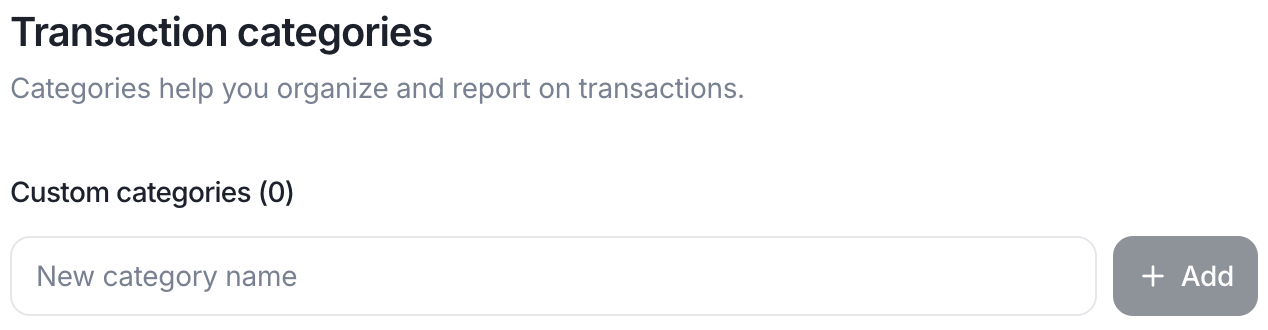
Owners and accounting members can add custom categories from the [Transaction Categories settings](https://app.getlemma.com/_/settings/transaction-categories). You can always rename a custom category later.
Categories are saved instantly and visible to all team members with access to your provider.
Read-only team members can also set categories. Categorization is treated as an annotation, not a financial action.
### When sending a transfer
Every time you send money from the [Move Money page](/guides/move-money), you will see an optional **Category** field. The category is applied to the resulting transaction the moment it's created, so there's nothing to tag afterwards. If the transfer needs [approval](/guides/approval-rules) first, the category is applied when the transfer is approved and sent.
## Built-in categories
The following categories are available to every provider by default:
| Category | Common use |
| ------------------------------ | -------------------------------------------------------------- |
| **Revenue** | Practice or business income not tied to a specific payer |
| **Payer Remittance** | Insurance payer payments on submitted claims |
| **Patient Copay** | Copays and out-of-pocket amounts collected from patients |
| **Interest** | Interest earned on account balances |
| **Patient / Insurance Refund** | Refunds issued to patients or returned to payers |
| **Payroll** | Staff wages and employer payroll taxes |
| **Rent & Utilities** | Office or equipment lease payments and utilities |
| **Supplies & Inventory** | Medical or office consumables |
| **Equipment Purchase** | Capital purchases of clinical or office equipment |
| **Insurance Premium** | Malpractice, health, property, or liability insurance |
| **Software & Subscriptions** | SaaS subscriptions and software licenses |
| **Professional Services** | Legal, accounting, or consulting fees |
| **Vendor Payment** | Suppliers, contractors, or service providers |
| **Bank Fees** | Account, wire, or card-processing fees |
| **Taxes** | Federal, state, or local tax remittances |
| **Travel & Transportation** | Mileage, airfare, lodging, and other travel costs |
| **Business Meals** | Meals with patients, staff, or partners |
| **Marketing** | Ads, promotional materials, marketing agencies |
| **MSO Fees** | Periodic management fees paid under an MSA |
| **MSO Loans** | Loans from an MSO to a PC or PLLC entity |
| **MSO Loan Repayment** | Principal or interest payments on loans from the MSO to the PC |
| **Owner Distribution** | Profit distributions to owners or shareholders |
| **Loan** | Loan proceeds received or repaid |
| **Intercompany Transfer** | Transfers between related entities under common ownership |
| **Intracompany Transfer** | Transfers between accounts of the same entity |
## Why categories matter for MSOs
Management services organizations that operate under a management services agreement (MSA) must keep a clear audit trail distinguishing payments made under the MSA from loans made to the professional corporation. Misclassifying an MSO fee as a loan repayment (or vice versa) can create legal exposure during a practice acquisition, state licensing review, or tax audit.
Categories make that distinction explicit. Tagging every outbound transfer as **MSO Fees** or **MSO Loan Repayment** as it happens, rather than reconstructing intent months later, keeps your records defensible.
## Custom categories
### Creating a custom category
Owners and accounting members can add custom categories from the [Transaction Categories settings](https://app.getlemma.com/_/settings/transaction-categories). You can always rename a custom category later.
 ### Archiving a custom category
If a custom category no longer fits your workflow, owners and accounting members can archive it from the same settings page. On mobile, hover over a category and click the trash icon, or tap it on mobile and choose Archive.
Archiving removes the category from the category dropdown so it can't be selected for new transactions. Any transaction already tagged with that category keeps its label, archiving never changes or removes existing categorization.
### Archiving a custom category
If a custom category no longer fits your workflow, owners and accounting members can archive it from the same settings page. On mobile, hover over a category and click the trash icon, or tap it on mobile and choose Archive.
Archiving removes the category from the category dropdown so it can't be selected for new transactions. Any transaction already tagged with that category keeps its label, archiving never changes or removes existing categorization.